
Important Facebook News!
Facebook has recently changed the way pages will look. All pages will need to transition to this new format over the coming months. Our page is no exception, and we know you might have questions about the update. Don’t worry, we’re here to help!
Here’s what we recommend doing to make sure you never miss one of Lisa’s posts or shows:
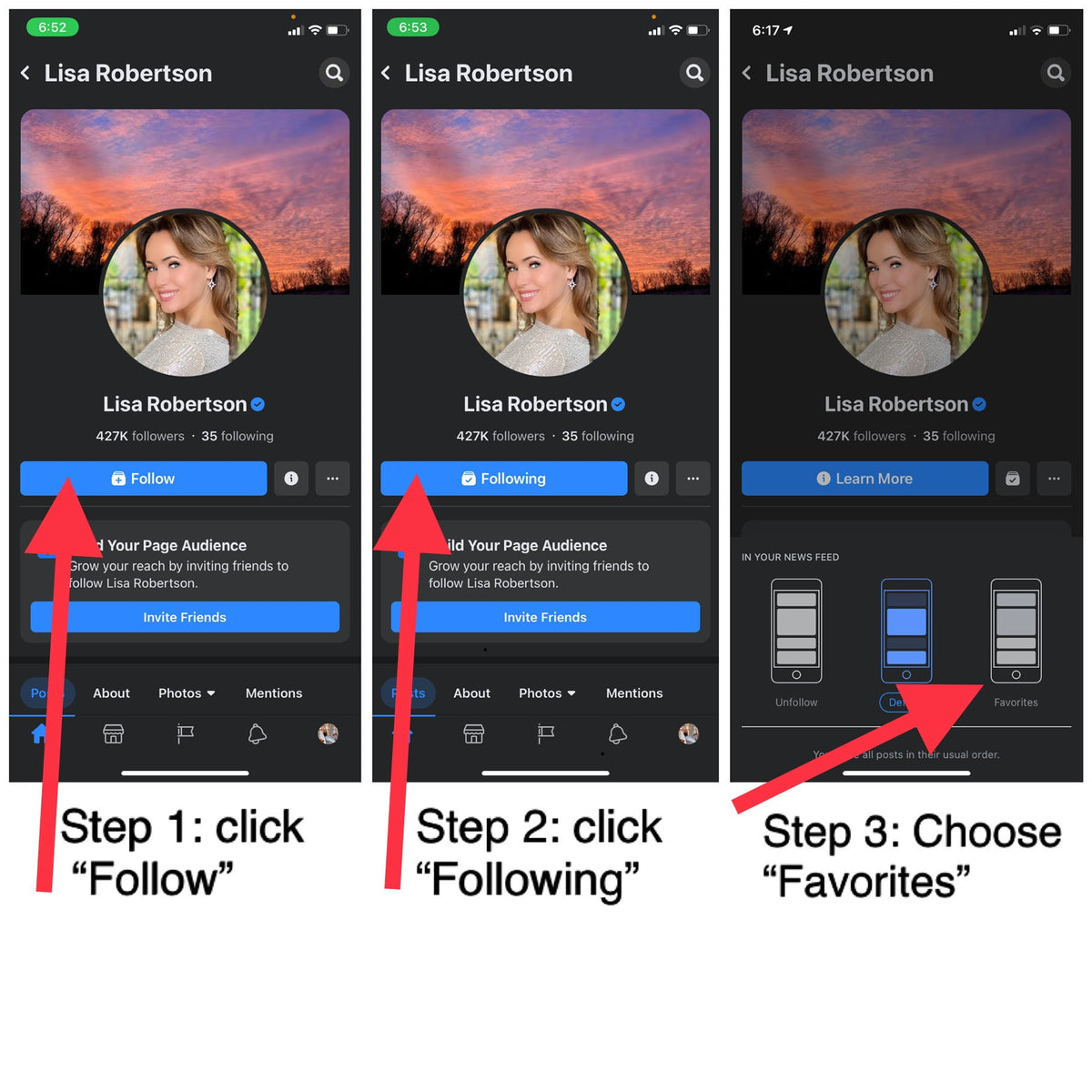
On a MOBILE device, in the Facebook application (not a browser), search for Lisa’s page. When you arrive to the page, you will either see a blue button that says “Following” or a blue button that says “Learn More”
If you have a BLUE FOLLOW BUTTON, follow these steps
- Click “Follow”
- Click “Following”
- Choose “Favorites” from the menu that appears in the bottom of your screen
If you have a BLUE LEARN MORE BUTTON follow this one step
- Next to the “Learn More” button, you will see a small square button with a checkmark in the center. Click this and choose “Favorites” in the menu that appears at the bottom of your screen
Below is a photo that shows an example of steps.

Now, to make sure you don’t miss any live shows, there is one more step!
You can either navigate to a past live show, or wait for the next live to happen. You should see a small popup that looks like the image below. Please click on “Get All Live Notifications”.
That’s it!

Here are some recommendations/helpful tips about this new Facebook experience:
- For the best experience, we recommend using the Facebook App (downloaded from the app store), on a mobile device.
- If you have no choice but to use a web browser on a computer, please use Google Chrome for the best experience.
- The Community feature has been re-named “Mentions.”
- You MUST be a member of Facebook in order to see posts on pages moving forward. This is not a decision made by us, but rather one made by Facebook. If you do not have a Facebook account, you will not be able to see Lisa’s Facebook page.
- If at any time, you get lost and need to find your way back to Lisa’s page, you can use this link. Maybe save it in the notes of your phone, or send it to yourself in an email that you will easily be able to find later: https://www.facebook.com/Lisa.Robertson.07/
- If you want to see Lisa’s videos, you can go to this link: https://www.facebook.com/Lisa.Robertson.07/videos
Hopefully this helps, but if you are still experiencing trouble, you can always email us at customercare@lisarobertson.com and we will do our best to help you!
Ready to get back to shopping? You can shop my full collection and sign up for email updates here!


